Mastering Remote Work: Tech for Balance
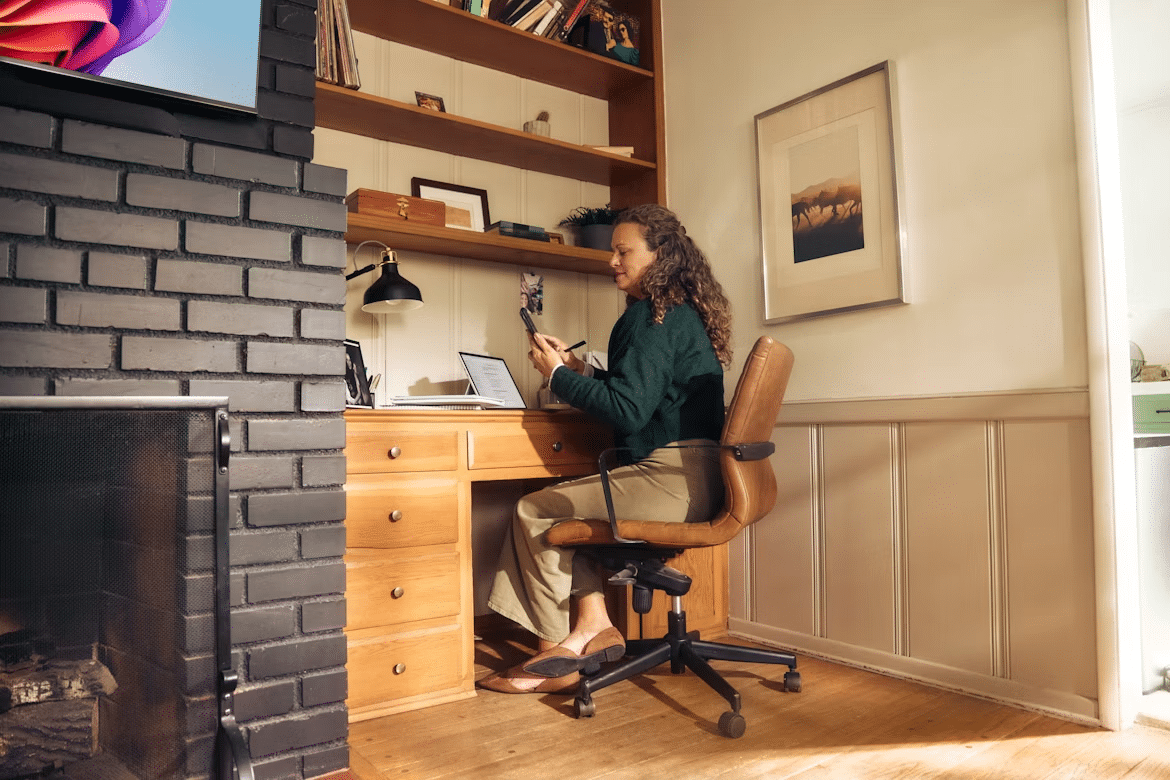
The shift to remote work offers incredible flexibility, but it often blurs the line between our professional and personal lives. When your living room doubles as your conference room, it can feel impossible to truly switch off. The trick isn’t to work harder, but to work smarter by using technology to create boundaries and restore balance.
With the right setup and mindset, you can design a remote work life that supports your well-being instead of draining it.
Creating Your Ideal Space
Your environment significantly impacts your focus and mood. While not everyone has a dedicated home office, setting up a specific workspace is a crucial first step. This physical boundary helps your brain understand when it’s time to work and when it’s time to relax. If possible, choose a spot with good natural light; it can boost energy and reduce eye strain.
Invest in an ergonomic chair and position your monitor at eye level to prevent neck and back pain. Even small adjustments can make a huge difference in your physical comfort throughout the day. Finally, keep clutter and personal distractions out of your immediate work area. A clean space promotes a clear mind and signals to yourself and others in your home that this is a zone for focus.
Essential Tech Tools
Having the right technology isn’t just about getting the job done; it’s about doing it efficiently so you have more time for yourself. Beyond a reliable computer, a few key pieces of tech can make your remote experience much smoother. Noise-canceling headphones can be especially helpful for blocking household distractions and improving call clarity, particularly in shared spaces. A high-quality external webcam and microphone also improve communication, making you appear more professional and engaged.
On the software side, project management tools like Trello or Asana help organize tasks and deadlines, stopping work from spilling into your personal time. Mastering these tools is one of the essential tech skills for remote work that helps you manage your workflow effectively. When your tasks are clearly defined and tracked, you’re less likely to feel overwhelmed or constantly behind.
Cloud storage and collaboration platforms can also make remote work much easier to manage. Tools like Google Drive, Dropbox, or Microsoft OneDrive let you access important files from different devices and reduce the risk of losing work if something happens to your computer. Keeping documents organized in shared folders also makes it easier to collaborate with colleagues without constantly sending updated files back and forth.
Optimizing Your Home Network
A slow or unreliable internet connection is one of the biggest frustrations for remote workers. Dropped video calls and lagging uploads can quickly derail your productivity and add unnecessary stress to your day. Before you consider upgrading your internet plan, there are a few simple things you can do to improve your existing connection.
Start by placing your Wi-Fi router in a central location in your home, away from walls and obstructions. This is one of many work-from-home essentials. For larger homes or those with multiple dead spots, a mesh network can provide consistent coverage everywhere.
If your workspace is stationary, connecting your computer directly to the router with an Ethernet cable offers the most stable and fastest connection. While you might have heard of unconventional tips like the aluminum foil Wi-Fi experiment, focusing on router placement and a potential wired connection are your most reliable first steps.
Strategies for Digital Well-being
Technology can be a double-edged sword. While it makes remote work possible, it can also keep us perpetually “on.” Reclaiming your time requires proactive strategies for managing your digital life. One of the most effective methods is to be ruthless with your notifications. Turn off all non-essential alerts on your phone and computer. This lets you check messages on your own schedule rather than being constantly interrupted.
Using “do not disturb” or focus modes during deep work sessions is also incredibly helpful. Many experts recommend time-blocking techniques and other strategies for maintaining productivity that build in dedicated breaks. Step away from your screen, stretch, or walk around for a few minutes every hour. Most importantly, have a clear end to your workday. Log out of work accounts, close your laptop, and put it away to create a mental and physical separation.
Setting Clear Communication Boundaries
Remote work can make it feel like you should always be available, especially when messages arrive outside normal working hours. Setting clear expectations with colleagues and clients can help prevent that pressure from becoming part of your everyday routine. Let people know when you are usually online, how quickly they can expect a response, and which channels should be used for genuinely urgent matters.
It also helps to avoid checking work messages during evenings, meals, or other personal time unless your role truly requires it. Features like scheduled email delivery, status indicators, and automatic replies can reinforce these boundaries without creating friction. The clearer your availability is, the easier it becomes to protect your downtime and avoid the feeling that work is following you around the house.
Achieve Work-Life Harmony
True work-life harmony isn’t about a perfect 50/50 split, but about feeling in control of your time and energy. The tools and strategies discussed here are designed to give you that control back. It starts with a dedicated space that tells your brain when it’s time to work. It’s reinforced by using tech tools that streamline your tasks and a home network that doesn’t cause daily frustration.
The final and most crucial piece is creating rituals that signal the transition between your work self and your personal self. This could be a five-minute meditation, changing your clothes, or going for a short walk at the end of your workday. These simple actions create powerful psychological boundaries, allowing you to be fully present in your work when you’re on the clock and fully present in your life when you’re not.
By intentionally designing your remote work environment, you can move from a state of constant connection to one of purposeful engagement. This allows you to enjoy the freedom and flexibility of working from home without sacrificing your peace and well-being.
The goal is not to be available all the time or to create a perfect home office overnight. Choose one change that reduces friction – a clearer desk, better monitor height, fewer notifications, a more reliable connection, or a defined end-of-day ritual – and build from there.